Showing posts with label Chat Bar. Show all posts

Pandanda Calendar!


Hey Guys!

Henry gave us a sneak peek showing us the "Pandanda Calender", and now - it's out!

It's really cool! :D

Just click the calender icon on the bottom of your screen.


Then the calender will pop up! From this, you can see a bunch of upcoming Pandanda Events!
  • March 14th: Zing is leaving.
  • March 17th: St. Patrick's Day (With a Free Item!)
  • March 20th: PDC's Party!!! xP
  • March 27th: Easter Egg Hunt Begins.
  • April 4th: Easter Day!
  • April 11th:  Easter Egg Hunt Ends.
  • April 19th: Zing Returns!
  • May 5th: Cinco De Mayo
  • May 16th: Zing is leaving.

To add a event, just hover over the day you want to add it, then click "Add Event"


Choose the kind of Event you want (Party, Fishing, etc.) then choose the room, time, and server.

After that, you choose the buddies you want to get the invitation.


Then the event will appear on your, and the friends you invited calendar's ^.^


The Buddies you invited will get an invitation (Like a buddy request) for the event in their mail ^.^

I love this update, its's going to be VERY useful! What do you think?

-Lime12101

Pandanda Updates Buddy List


Hey Guys!

Pandanda updated their Servers earlier, and made the buddy list alphabetical, so now it's easier to find your buddies.


The List Goes: The People who are online, Numbers, and then Alphabetic Letters.

I personally love this feature :D It's way easier to find your buddies now!

Thanks Clones for the info.

~Lime12101 Pandanda Cheats™ President

Pandanda Nubbing Glitch!


We've received many comments informing us about a Glitch that was recently discovered on Pandanda, the Walking under the Chat bar Glitch A.K.A The nubbing being pandas glitch A.K.A The Nubbing Glitch A.K.A The Nubbin' Glitch ;-)

You can "Nub" behind the Chat Bar OR you can nub behind a Special Panda on Pandanda.

Read my step-by-step tutorial to help with the glitch.

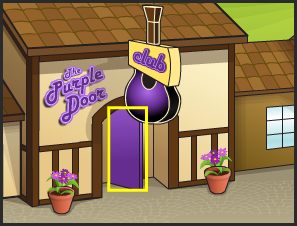
1. Go to a room with a Door in it (Treehouse Lobby, Den, East Market Street, West Market Street, Bear Hollow)
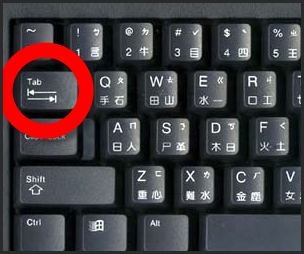
2. Click "TAB" on your keyboard.


3. Click Tab until a yellow box is over the door.


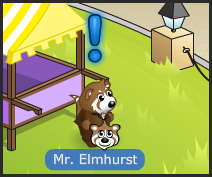
4. Put your cursor over a Panda (If you want to nub behind a panda) or the chat bar (If you want to nub under the chat bar).


5. Make sure the yellow box is over the door AND the cursor is where you like at the same time.
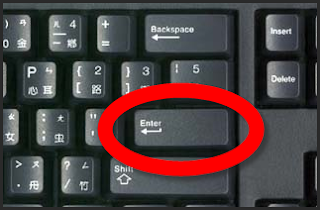
6. After completing number 5 click "ENTER" on your keyboard.


Your panda will walk over to the place where your cursor was, and you will be officially Nubbing!

When nubbing behind the chat bar, you can move from side to side, clicking the sides of the chat bar, and other places on the chat bar.

When you nubbing behind a Panda, you can talk and it will look like the Panda's Talking!

Here is what it looks like when I nub:


I think this is one of the coolest Glitches, I hope Pandanda doesn't fix it! Visit my Cheats & Glitches page for more Cheats & Glitches!

~Lime12101 Pandanda Cheats President

PS: Alto is on vacation and he will be back on Tuesday (July 21st)

Henry Update: Party Reminder and Performance Help!


Henry just updated his blog! Here is what he said:

Hey Pandas! I just wanted to remind everyone of the party tomorrow! Check my post below to see when I'll be in Pandanda. I'll be moving around between both servers so if you see me be sure to say 'hi'!

I hope to see everyone there, but even if you can't make it during the times I'll be on, you can still log in any time this weekend to receive the party gift.

Some Pandas have asked how to improve the performance of the game. The performance of Pandanda can be affected by many different things including server population, your computer’s speed, and the size of your web browser window.

One way to improve the performance is to change the "Graphics Quality" from the options menu. You can access the options menu by selecting the options icon on the menu bar. The "Graphics Quality" has settings of "High", "Medium", and "Low". You can try them all out to see which works best for your computer.

Here are some other things you should try:
Make sure no other applications are running on your computer other than your web browser.

> Make sure no other applications are running on your computer other than your web browser.

> Do not download music or video while playing Pandanda.

> Close any other tabs you have open in your web browser.

> Shrink the game size by shrinking your web browser window.

> Sometimes it may help to reboot your computer if you have not done so in several days.


SWEEET! I knew most of that but...oh well.

We will be posting the party secrets shortly, be sure to come back!

~Lime12101 Pandanda Cheats President

Talk with the Newspaper Glitch!


Hey guys!

This glitch is a spin-off from the Do Actions With The Backpack Sign Glitch, I think its kinda cool!

Follow these simple steps to learn how:

1) Open the newspaper.


2) Press "Tab" on your keyboard (Its above enter) 8 times, or until its over the chat box at the bottom.


Press about 8 times...


3) Type in what you want, then press enter (on your keyboard)!


Then press Enter...


Here is a picture alto took, I was saying "rocks" (I was referring to "limey Rocks")


~Lime12101 Pandanda Cheats™ Creator

Darby fields r here !!!


Woo hoo !
The darby fields r here


This is wat they look like
They also include a bunny catching game =D
This is wat the field looks like


This is farmer Dan
He works there and his bunnies escape a lot XD 
 

Plus Paige is now wherein new clothes =D


There has also been an update to the chat bar
Now the newspaper and sherif options r on the chat  bar


If I find more updates I'll post bout em

- AltoBhai , Pandanda Cheats ™ Vice President -